
The A/B split testing option lets you split the traffic a tracking link receives and send your users to two or more landing pages. This is very useful method of comparing two versions of a web page against each other to determine which one performs better (i.e., which is converting better). The A/B split test is an experiment in which two or more variations of a page are randomly shown to users and statistical analysis is used to determine which variant works best for a given conversion goal (e.g., a purchase).
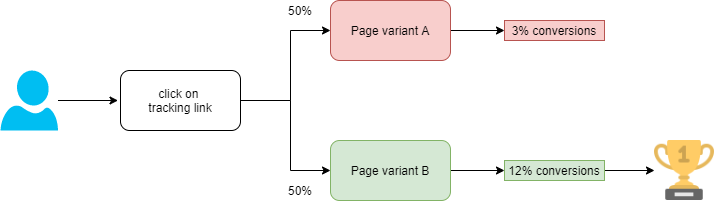
How to create a split test
- create a tracking link
- enable and configure the A/B split testing option (it also needs to be connected to conversions to understand which landing page works better, see below for details)
- insert the tracking link in step 1 in your ads, pages, etc...
- when people click on this link they are redirected to different landing pages
- once you discover which page is performing better you can disable the A/B split testing option.
Which configuration is best for my needs
It depends on what you want to achieve, but in general there are 2 distinct scenarios.
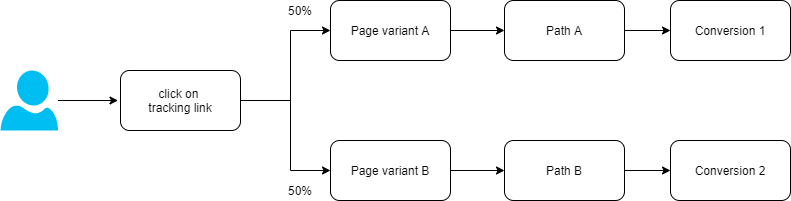
In scenario 1 your users follow 2 distinct paths after they clicked on your tracking link and landed on one of the landing pages. In this scenario, you need to choose a different conversion for each destination URL.
In scenario 2, your users follow the same path after they clicked on your tracking link and landed on one of the landing pages. In this scenario, you only need to choose one conversion for each destination URL.
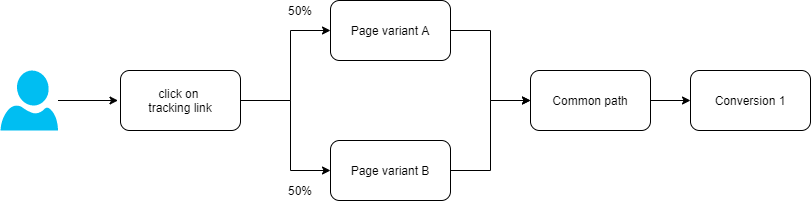
WARNING: In scenario 2, our system uses the extended parameter ep14 to evaluate the efficiency of page variants, therefore, this parameter cannot be used with the conversions linked to the tracking link.
Comments
0 comments
Article is closed for comments.